Showing posts with label netgear adapter. Show all posts

Saturday, November 13, 2010

Netgear Adapter

0 comments
Installation  :

Wireless Setup :

Monday, November 1, 2010

Connect using Netgear Smart wizard

0 comments
Click Start > All programs > Netgear Adapter > Netgear smart Wizard > Click the Networks Tab
Select the Network and click Connect.
Here Name for the network Netgear and its configured with wpa-psk security

Type your password and click Apply.

If your network is configured with wep security, then under security select enter key manually and type you wep key and click apply.

Netgear USB Adapter installation

0 comments
Insert the netgear USB adapter resource cd into the computer and click Install software.


If you dont have the cd go to kb.netgear.com and download the drivers for the adapter.  Click the setup.exe file which you have downloaded


Click Run to extract the file


File gets extracted


Accept the licence Agreement and click Next


Select Express to install the program under program files. Select custom to change the location.
Click Next install the files.


File gets installed


Insert the usb adapter and click Next


Software detects the adapter


Select the Region and click Agree


Choose the software to manage you wireless connection and click Next


Select Yes and Click Next


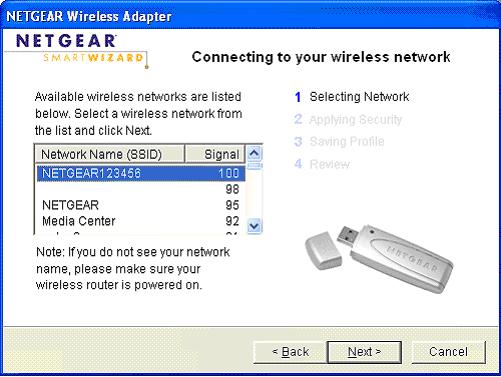
Select Your wireless network and click Next


It Detects your security type, click OK


Type your password and click Next


Enter Profile name and click Next


Review your settings and click Finish to complete the installation.


you get a popup box says that you are now connected to the internet.
Click OK and close the smart wizard.

Advertisement


Copyright 2008 All Rights Reserved Revolution Two Church theme by Brian Gardner Converted into Blogger Template by Bloganol dot com